Native USB MIDI
In “MIDI” USB mode, the tablet shows up on the computer as a standard MIDI controller. Windows recognises it without a driver, and the app writes directly to that port: no network in between.
 SOMA23 DECKAndroid app · version 1.0
Your tablet becomes a DJ controller for rekordbox. Connected to the computer with a USB cable, as native MIDI: no Wi-Fi, no bridge, no driver to install. Two decks with jog wheels, pads and loops, the mixer in the middle.
Android 6 or later · tablet in landscape · USB data cable · rekordbox on a computer · interface in French
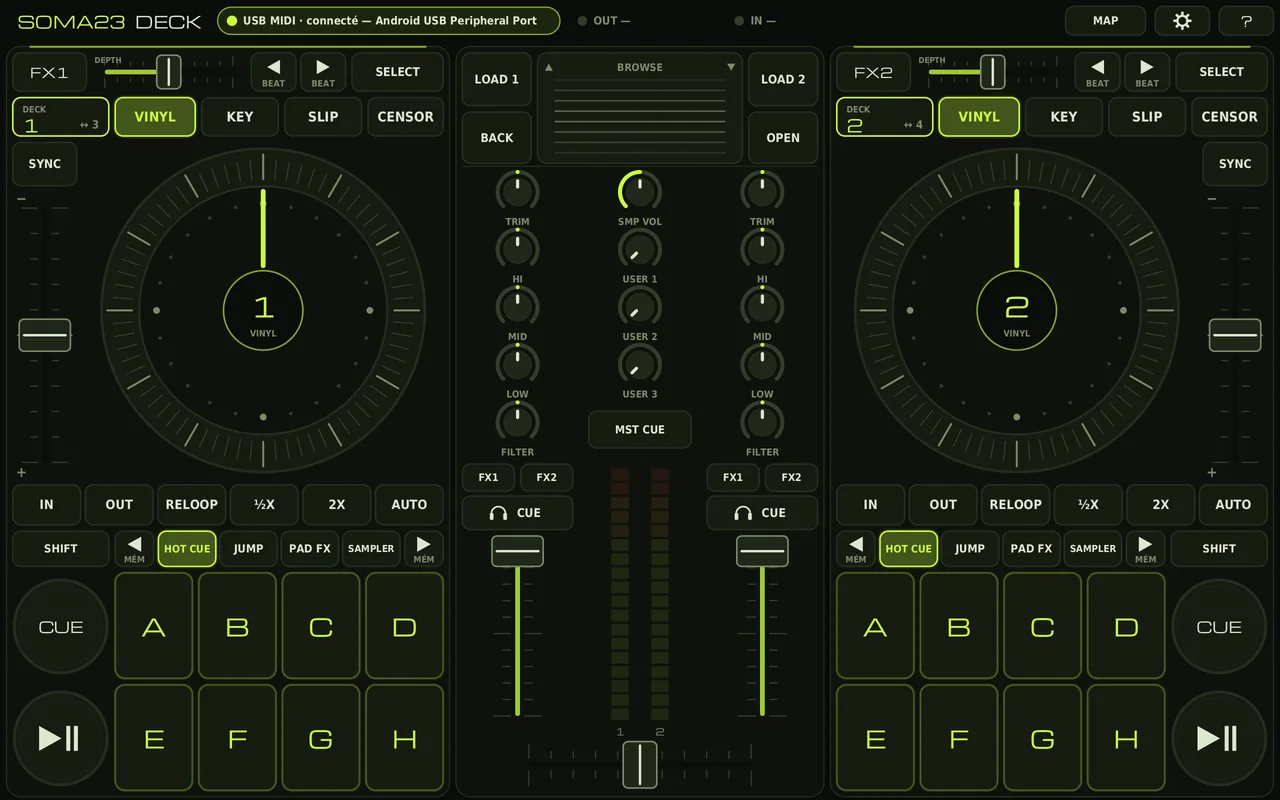
The app rendered at the Xiaomi Pad 5 resolution · 2560 × 1600
Android can present itself to a computer as a USB MIDI device. SOMA23 DECK uses this: rekordbox sees the tablet as a controller, and every gesture on the screen goes straight into the software.
In “MIDI” USB mode, the tablet shows up on the computer as a standard MIDI controller. Windows recognises it without a driver, and the app writes directly to that port: no network in between.
The app sends exactly the messages of a Pioneer DDJ-SX controller: same channels, same notes, same CCs, 14-bit faders. The included mapping reuses the lines of the Pioneer file that ships with rekordbox as they are: each control carries the name of its function.
When rekordbox sends them, the tablet displays its feedback: playback, sync, hot cues set, active FX, channel levels, playback position on the jog wheel, end of track. Without it, the app works normally.
The two decks face each other, the mixer is in the centre. Everything fits on a tablet screen in landscape.
No fader jumps. Touching a fader or a knob never changes its value; only sliding counts. A magnetic zero point on the tempo, the EQs, the gain, the filter and the crossfader.
Double-tap a knob: back to centre.
Hold SHIFT, either one: START, MASTER, RANGE, REVERSE, RETRIG, EXIT, MOVE, ACTIVE, TAP, AREA, ZOOM, hot cue deletion, sampler stop, jog search.
Four decks with DECK 1↔3 and 2↔4. Decks 3 and 4 turn amber to avoid any confusion.
Android back button: press twice to quit, against slips in the middle of a set.
Screen always on, full screen. System gestures are kept away from the edge faders, as far as Android allows.
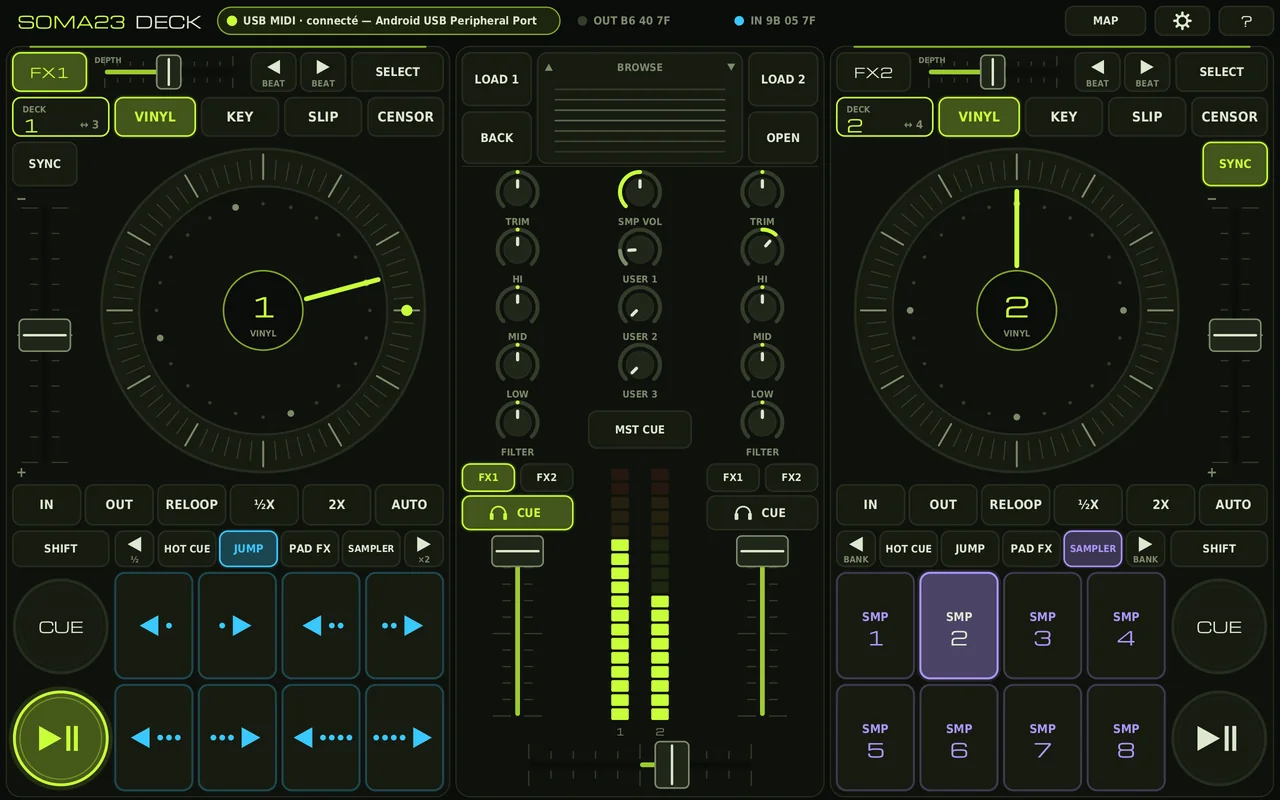
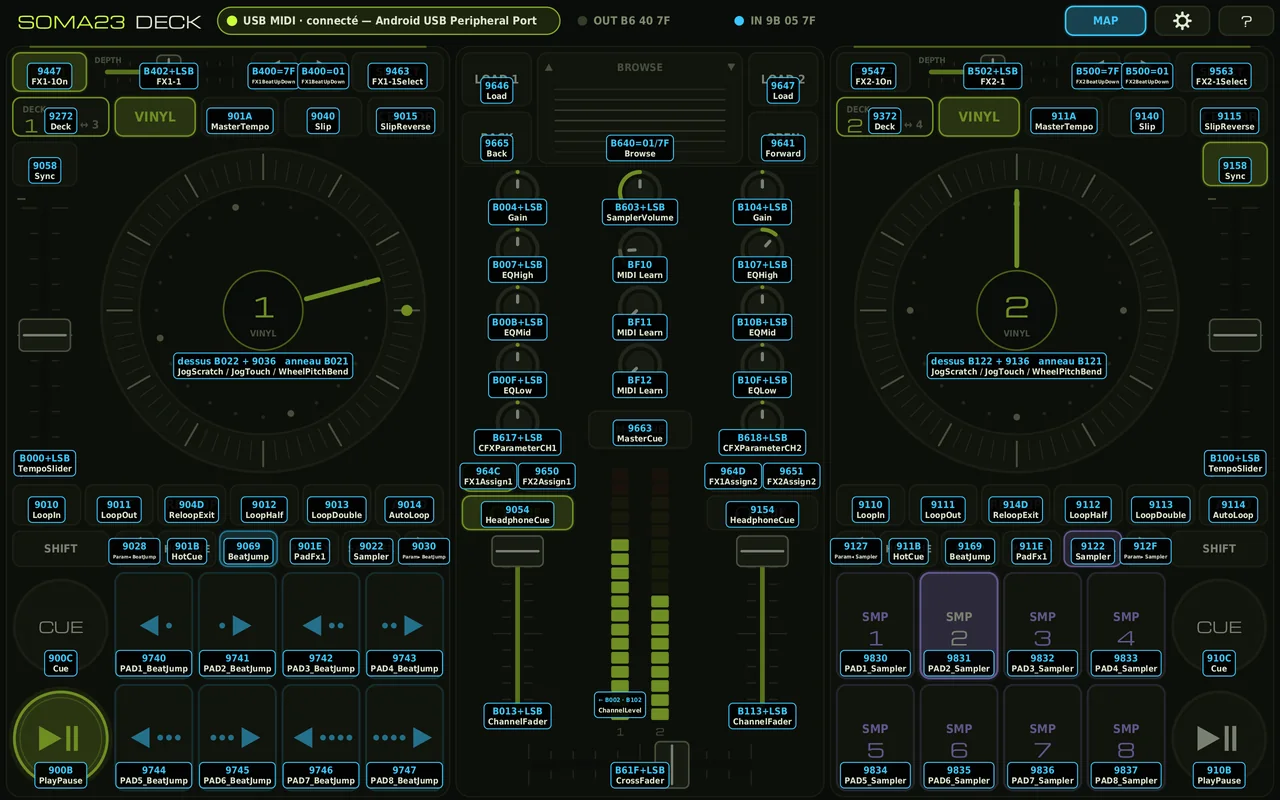
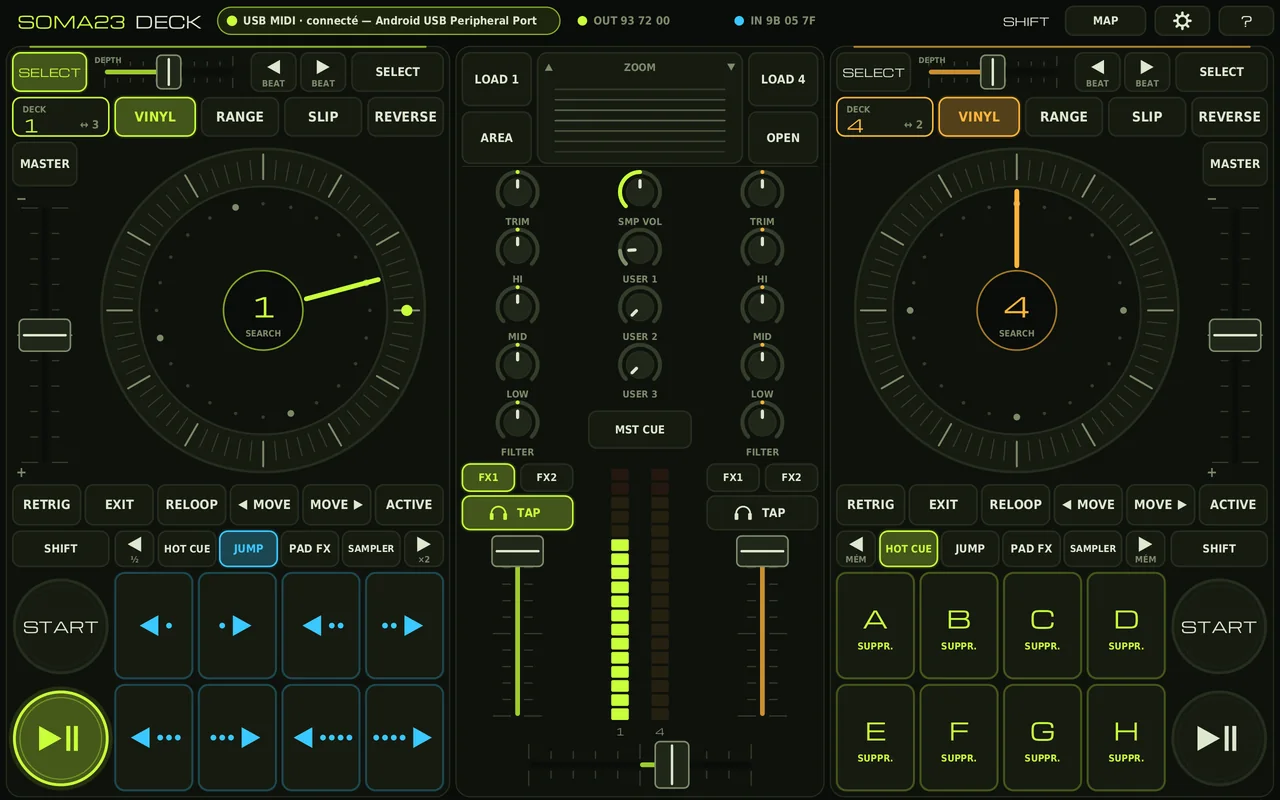
Scroll to see the other screenshots.
The app installs directly from the APK file. The rekordbox mapping downloads alongside it.
adb install SOMA23-DECK-v1.0.apk from the computer.rekordbox reserves its jog functions (scratch, jog pitch bend) for the Pioneer controllers it recognises, which is why tools like RekordJog exist. SOMA23 DECK sends the real Pioneer jog messages anyway, and their lines are at the end of the mapping. Two cases can arise: check with your version of rekordbox.
Scratch on the top of the jog (VINYL on), pitch bend on the ring, search with SHIFT. Nothing more to do.
MIDI Learn the notes BEND− (0x70) and BEND+ (0x71) onto rekordbox’s pitch bend functions. The jog ring holds the right note for as long as it turns: you nudge with the jog.
Encoding and sensitivity are set in Réglages → Jog (settings). By default: values 64 ± 6…19, the format used by RekordJog to drive a DDJ-SX jog wheel in rekordbox 6 and 7.
Import refused in rekordbox: replace SOMA23 DECK on the first line of the .csv file with the exact device name shown by rekordbox.
Faders moving in jerks, or not moving: in the app, turn off Réglages → Haute résolution 14 bits (14-bit high resolution), then import the 7-bit mapping.
A function is missing? The MAP button shows the MIDI code of every control, enough for a MIDI Learn. USER 1 to 3 are free for that.
Tempo the wrong way round: the direction of the tempo fader can be inverted in the settings.
Deck n → channel n (90+n−1 / B0+n−1). Pads of deck n → channel 7+n (97…9A). Codes given for deck 1. Faders and knobs in 14-bit: MSB on the CC shown, LSB on CC + 0x20.
| Control | Message | With SHIFT | rekordbox function |
|---|---|---|---|
| PLAY | 90 0B | 90 47 | PlayPause |
| CUE | 90 0C | 90 48 | Cue / JumpToTrackStart |
| SYNC | 90 58 | 90 5C | Sync / Master |
| KEY | 90 1A | 90 60 | MasterTempo / TempoRange |
| SLIP | 90 40 | 90 63 | Slip |
| CENSOR | 90 15 | 90 38 | SlipReverse / Reverse |
| LOOP IN | 90 10 | 90 4C | LoopIn / ReTrigger |
| LOOP OUT | 90 11 | 90 4D | LoopOut / ReloopExit |
| RELOOP | 90 4D | 90 4D | ReloopExit |
| ½X | 90 12 | 90 61 | LoopHalf / LoopMoveLeft |
| 2X | 90 13 | 90 62 | LoopDouble / LoopMoveRight |
| AUTO | 90 14 | 90 50 | AutoLoop / ActiveLoop |
| Headphone CUE | 90 54 | 90 68 | HeadphoneCue / TapBpm |
| DECK 1↔3 | 9n 72 (selected deck) | — | Deck |
| Pad tabs | 90 1B · 90 69 · 90 1E · 90 22 | — | HotCue · BeatJump · PadFx1 · Sampler |
| Pad ◀ ▶ | 90 24/2C · 28/30 · 25/2D · 27/2F | — | Parameter1Left/Right_(mode) |
| Pads HOT CUE A–H | 97 00–07 | 97 08–0F | PADn_HotCue / PADn_HotCue+Shift |
| Pads JUMP | 97 40–47 | 97 40–47 | PADn_BeatJump |
| Pads PAD FX | 97 10–17 | 97 10–17 | PADn_PadFx1 |
| Pads SAMPLER | 97 30–37 | 97 38–3F | PADn_Sampler / PADn_Sampler+Shift |
| Tempo | B0 00 | — | TempoSlider |
| Channel fader | B0 13 | — | ChannelFader |
| TRIM | B0 04 | — | Gain |
| HI / MID / LOW | B0 07 / 0B / 0F | — | EQHigh / EQMid / EQLow |
| FILTER (channel n) | B6 17+n−1 | — | CFXParameterCHn |
| Jog top, VINYL on | 90 36 + B0 22 | 90 67 + B0 1F | JogTouch + JogScratch / JogSearch |
| Jog top, VINYL off | B0 23 | 90 67 + B0 1F | JogPitchBend / JogSearch |
| Jog ring | B0 21 | B0 26 | WheelPitchBend / WheelSearch |
| BEND− / BEND+ | 90 70 / 90 71 | — | to assign (MIDI Learn) |
| BROWSE | B6 40 = 01 / 7F | B6 64 | Browse / Zoom |
| OPEN | 96 41 | 96 42 | Forward |
| BACK | 96 65 | 96 66 | Back / Area |
| LOAD deck n | 96 46+n−1 | — | Load |
| MST CUE | 96 63 | — | MasterCue |
| FX1 / FX2 on channel n | 96 4C+n−1 / 96 50+n−1 | — | FX1Assignn / FX2Assignn |
| Crossfader | B6 1F | — | CrossFader |
| SMP VOL | B6 03 | — | SamplerVolume |
| FX1 ON | 94 47 | 94 63 | FX1-1On / FX1-1Select |
| FX1 DEPTH | B4 02 | — | FX1-1 |
| FX1 BEAT ◀ / ▶ | B4 00 = 7F / 01 | — | FX1BeatUpDown |
| FX1 SELECT | 94 63 | — | FX1-1Select |
| FX2 | 95 … / B5 … | same numbers | FX2-… |
| USER 1–3 | BF 10–12 (7 bits) | — | to assign (MIDI Learn) |
rekordbox feedback read by the app: LEDs on the same codes as the buttons, channel level B0 02, playback position BB 00–03 (1…72), end of track 9B 04–07.
The mapping reuses the lines of the official Pioneer file “PIONEER DDJ-SX.midi.csv” that ships with rekordbox, obtained through the public RekordJog repository, which also documents the jog format accepted by rekordbox 6 and 7. Michroma font: SIL Open Font License. rekordbox, Pioneer and DDJ-SX are trademarks of their respective owners; SOMA23 DECK is an independent project, not affiliated with them.